
Download ViStart – Windows Vista Start Menu, Windows XP interface, Start Menu customization, Vista aesthetic, lightweight skinning tool, user-shared skins, nostalgia for Windows Vista, Windows XP enhancement, simple interface update
Overview
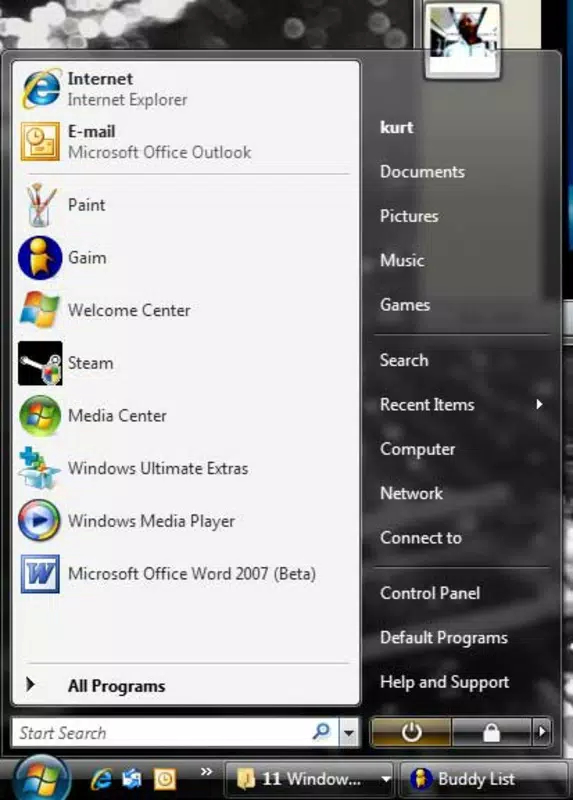
ViStart is a specialized utility designed for users of Windows XP who wish to enhance their operating system's interface with the visual appeal of Windows Vista, particularly focusing on the iconic Start Menu. The application addresses a common user need: the desire for a modern aesthetic without the performance overhead of upgrading to a newer OS. By offering a streamlined, targeted solution, ViStart enables users to enjoy the sleek design elements of Vista’s Start Menu—such as rounded corners, translucent effects, and a refined layout—while maintaining the stability and speed of their existing Windows XP environment.
Target users include long-time Windows XP users, retro computing enthusiasts, and individuals seeking a lightweight interface upgrade. The app is particularly valuable for those who are unable or unwilling to upgrade their hardware or OS due to compatibility constraints. Real-world use cases range from personal desktop customization to use in educational or legacy system environments where system performance must be preserved. In the broader software ecosystem, ViStart occupies a niche role as a minimalist skinning tool, standing out for its singular focus on one interface element rather than full OS transformation.
The developer, ViStart, did not provide additional technical details about the project’s background or development philosophy. However, the app’s release date of November 8, 2007, places it within a period of significant interest in OS aesthetics and user interface customization. Despite its age, the application remains relevant for users seeking a simple, low-impact enhancement to their computing experience.
Key Features & Functionality
- Vista-Like Start Menu: ViStart replicates the visual design of the Windows Vista Start Menu, including its rounded corners, subtle gradients, and updated icon layout. This feature allows users to experience a more modern interface without altering the underlying system.
- Easy Customization: The tool provides a point-and-click interface for adjusting colors, button styles, and layout preferences. Users can tailor the Start Menu to match their personal taste, making it accessible even to non-technical users.
- User-Shared Skins: A community-driven aspect of ViStart enables users to create and share custom skins. This fosters a collaborative environment where users can discover new designs and contribute their own, enhancing the app’s long-term usability and appeal.
- Lightweight Performance: Designed with efficiency in mind, ViStart consumes minimal system resources. It does not significantly impact CPU or memory usage, ensuring that the user’s system remains responsive and fast.
For example, a user working on an older machine with limited RAM can install ViStart to refresh the interface without slowing down their workflow. Another user might use the skin-sharing feature to find a retro-futuristic Start Menu design inspired by early 2000s aesthetics. These use cases highlight how ViStart balances visual enhancement with practical performance, making it a suitable choice for users prioritizing both form and function.
Interface, UX & Performance
ViStart features a minimalistic interface that focuses solely on the Start Menu customization process. The layout is clean and intuitive, with clearly labeled options and visual previews of changes in real time. Navigation is straightforward, requiring only a few clicks to apply a new skin or adjust color schemes. This simplicity enhances usability, particularly for users unfamiliar with advanced system customization tools.
Although the developer did not list formal performance metrics, the app’s file size of 1.2 MB and its reputation as a lightweight tool suggest efficient operation. It is designed to run in the background without interfering with other applications. Users can expect consistent responsiveness across different hardware configurations, especially on systems with older processors or limited RAM.
Stability appears to be a strength of the application, as it has remained functional for over a decade. However, compatibility with modern systems is not guaranteed due to its age and platform-specific nature. The lack of recent updates may affect its performance on newer Windows versions, but for its intended audience—Windows XP users—the experience remains smooth and reliable.
Platform Compatibility & Technical Requirements
ViStart is designed for the Windows platform and is compatible with Windows XP. The application has a file size of 1.2 MB and runs on the specified operating system without requiring additional software or drivers. The developer did not specify minimum OS requirements beyond Windows XP, nor did they provide information on support for later Windows versions.
Compatibility with modern systems such as Windows 10 or Windows 11 is not confirmed. Users attempting to install ViStart on newer platforms may encounter issues related to outdated APIs, missing system libraries, or security restrictions. The absence of official support for current OS versions means the app is best suited for legacy environments where Windows XP is still in use.
Pros and Cons
Pros
- Offers a nostalgic Vista aesthetic without OS upgrade
- Lightweight with minimal system impact
- Simple, intuitive interface for non-technical users
- Supports user-created and shared skins for customization
- Free to download and use
Cons
- Only available for Windows XP, limiting modern compatibility
- No official updates since 2007
- Limited to Start Menu customization—no broader UI changes
- May not function on newer Windows versions due to outdated code
- Developer did not provide technical documentation or support
FAQ
Is ViStart safe to download and install?
Yes, ViStart is free and has been used by many users since its release in 2007. As with any third-party application, it is recommended to download from trusted sources to avoid malware.
Can I use ViStart on Windows 10 or Windows 11?
ViStart was designed for Windows XP and may not function properly on newer operating systems. Compatibility is not guaranteed due to outdated system requirements.
Does ViStart require administrative privileges?
The application does not explicitly require admin rights, but installation may need elevated permissions depending on the system configuration.
How do I share my custom skin with others?
ViStart includes a built-in feature to export and share custom skins. Users can save their designs and distribute them through community forums or personal networks.
Is there a mobile version of ViStart?
No, ViStart is a desktop utility for Windows XP and is not available on mobile platforms such as Android or iOS.
Final Thoughts
ViStart remains a compelling choice for Windows XP users seeking a simple, effective way to modernize their interface with the nostalgic look of Windows Vista. Its focused approach—enhancing only the Start Menu—ensures that performance is preserved while delivering a visually satisfying upgrade. The inclusion of user-shared skins adds a creative dimension, fostering a small but active community of customizers.
While the app’s age and lack of updates present limitations for modern users, its core functionality remains intact for its intended audience. For those still running Windows XP or maintaining legacy systems, ViStart offers a secure, lightweight, and free tool to breathe new life into an aging interface.
Download ViStart now


